Radio USA - Live Radio FM / AM
- 4.7
- Rating
- 1.00M
- Installs
- Free
- Price

 Analysis by App-foxy
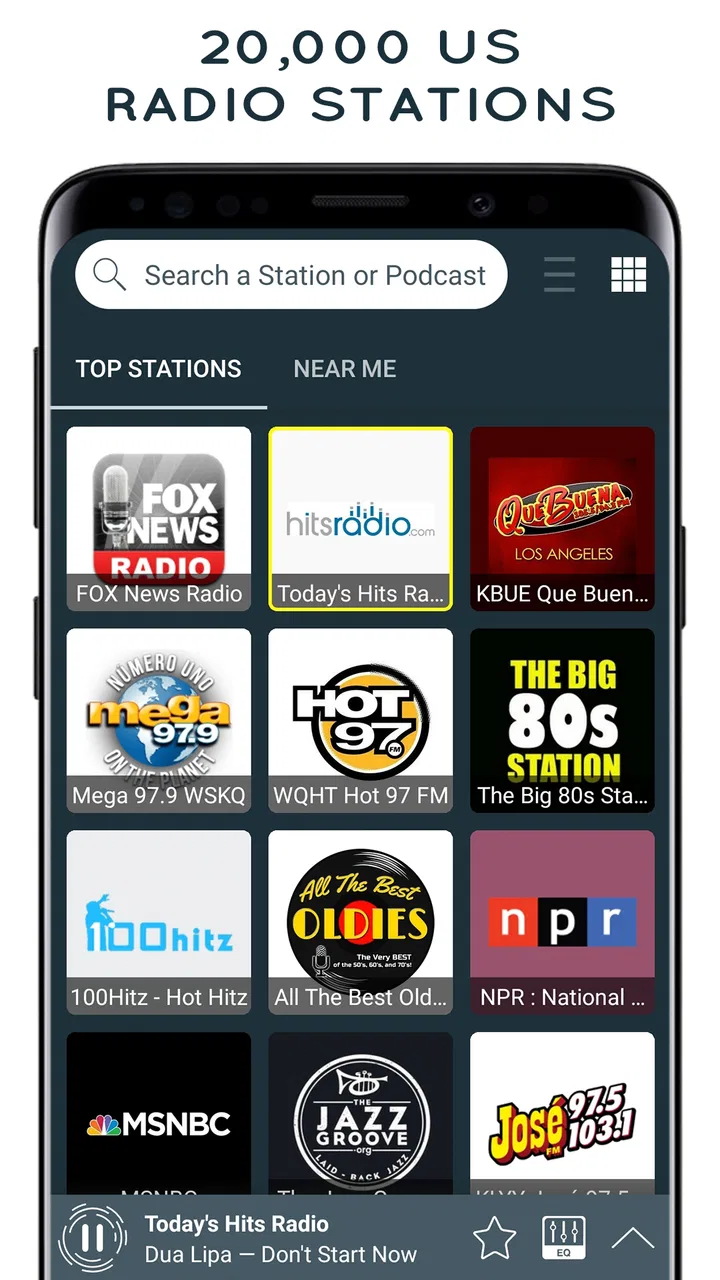
I approached Radio USA - Live Radio FM / AM as a practical listening tool rather than just another station directory. Its purpose is straightforward: give me access to live AM and FM radio through a phone, with a focus on radio from the United States. That simplicity is its main attraction, but it also means the quality of the experience depends heavily on how quickly I can find a useful station and how reliably the stream behaves on my connection.
The app sits in the Music & Audio category and is free to install. It is aimed at teenagers and older listeners, and the developer is Radio FM Online Free. The current release is version 4.1.7, while compatibility starts with Android 8.0, so it remains accessible on many phones that are no longer brand new. I found the basic idea easy to understand: open the app, browse or select a station, and begin listening without building a personal music library first.
That makes it appealing for people who want live programming, news, talk, sports commentary, or a sense of what is playing in a particular part of the country. It is less suitable for someone who expects the control of an on-demand music service. You do not approach live radio with the same expectations as a playlist app, and understanding that difference prevents most disappointment.
You May Also Like

 Blood Strike: 2.5 Anniversary
Blood Strike’s Loadouts Turn Every Drop Into a Tactical Gamble
A close look at Blood Strike’s custom loadouts: how fast access to signature weapons reshapes its battle royale rhythm, rewards preparation, and narrows the gap between fights.

 Pandora - Music & Podcasts
Pandora’s Music Is Easy to Start, but Harder to Recover
Pandora’s strength is its low-effort path from a seed to a station. Its weak spot is how much confidence it asks you to place in connection, setup, and quiet recovery.

 8 Ball Pool
 Is Built on Rivalries, Rematches, and Routine
A close look at the rivalries, rematches, shared routines, and unanswered safety questions that turn a quick pool match into a persistent mobile community.

 Samsung Music
’s Quiet Strength Is Playing What You Already Own
Its reach comes less from spectacle than from dependable access to a personal library. That simplicity is both the app’s strongest retention engine and its ceiling.

 AccuWeather: Weather Radar
AccuWeather Review: A Quick, Clear Forecast for Everyday Decisions
For everyday plans, the best forecast is the one you can understand quickly. AccuWeather makes rain timing, radar, and local conditions easy to act on, with a few trade-offs.

 Hill Climb Racing
Why Hill Climb Racing Still Turns Crashes Into One More Run
A tiny car, a bumpy hill and one more upgrade: Hill Climb Racing keeps resurfacing because its simple chaos makes every near-miss feel personal.
More From Our News Desk
View All News


Where the listening experience usually gets stuck
The first point of friction is often not the audio itself but the choice of station. A broad radio app can present many possibilities, and a new user may hesitate because the most useful station is not always obvious at first glance. I recommend deciding what you want before opening it: local-style talk, music in the background, news, or simply something to fill a quiet room. That small decision makes browsing much less aimless.
Another common stumbling block is assuming that “FM” means the phone is using its built-in radio hardware. In practice, an app built around live online stations depends on an internet connection. That matters when you are commuting through weak coverage, moving between Wi-Fi and mobile data, or trying to listen in a place where streaming is unreliable. If a station pauses, the cause may be the connection rather than the app’s interface.
I also found that live radio requires more patience than a downloaded track. A station may take a moment to begin, and changing stations can feel less immediate than tapping another song in a local player. The reward is that the content is live and unpredictable, but the trade-off is less control. You cannot treat every station like a personal playlist, and you should not install this app expecting universal pause, rewind, or skip behavior.
The app’s strong public reception suggests that its central use case works for many people. It carries an average rating of 4.7 from around 24 thousand ratings, and it has passed one million installs. I would read those figures as evidence that the basic radio concept is landing well, not as a guarantee that every station will behave identically on every phone. Streaming quality and availability can vary from one station to another.
A less obvious issue is listening context. At home, a short delay before playback is easy to tolerate. In a car, at work, or while cooking, repeatedly changing stations can be irritating because your attention is divided. I get better results when I treat the app as a quick live-radio doorway rather than something I constantly manage. Pick a station that fits the moment, lower the phone’s screen activity, and let the broadcast run.
Why station selection matters more than the app’s appearance
With this kind of service, the station is effectively part of the product. One channel may start quickly while another takes longer. One may suit background listening, while another is too talk-heavy for a busy afternoon. I would judge the app after trying several relevant stations instead of abandoning it after the first disappointing stream.
There is also a practical difference between wanting a familiar local broadcast and wanting a general American radio atmosphere. If your priority is one specific nearby station, a dedicated station app or its own official stream may be a better route. If you want variety in one place, this app is more convenient because it keeps the discovery process inside a single radio-focused tool.
Setup checks that prevent avoidable problems
The installation itself is uncomplicated for compatible Android devices. Since the minimum operating system is Android 8.0, I would first check the phone’s Android version before spending time troubleshooting. On a supported device, the next sensible step is to make sure the phone has a stable Wi-Fi or mobile-data connection. Opening another streaming service or a normal webpage is a quick way to see whether the problem is broader than this app.
I would also test the app with the phone’s volume raised to a comfortable level and with silent or do-not-disturb settings considered. It is easy to mistake a muted phone for a failed stream, especially when the interface appears to respond but no sound is immediately heard. Bluetooth deserves the same check: if the phone is connected to headphones, a car system, or another speaker, the audio may be going somewhere other than the phone’s own speaker.
The most useful setup habit is to test one station on Wi-Fi and one on mobile data. This separates station behavior from network behavior. If both work on Wi-Fi but struggle on mobile data, the likely issue is coverage, data restrictions, or a phone-level setting. If only one station fails while others play normally, the station stream itself may be the variable.
Battery-saving settings can also make long listening sessions less predictable on some Android phones. I would not immediately change every system option, but I would check whether the phone is aggressively limiting background activity when the screen turns off. This is especially relevant if playback stops after locking the device. The exact menus differ by manufacturer, so the safe approach is to look for the app in battery or background-use settings and adjust only if the problem appears consistently.
Data use is another decision worth making before a long session. Live audio is still streaming, so a limited mobile plan may not be the best environment for hours of listening. When I am at home or in the office, Wi-Fi is the sensible default. When I am away from Wi-Fi, I use mobile data only when the broadcast is worth the allowance and the signal is steady.
The free price makes trying the app easy, but users should still notice that in-app purchases are listed at $17.99 per item. I would not assume that every useful listening action requires payment, nor would I buy anything simply to solve a connection problem. First establish whether the basic stream works and whether the app fits your habits. A purchase should be considered separately from ordinary troubleshooting.
A simple first-session routine
My preferred first session is deliberately short. I connect to reliable Wi-Fi, open a station that matches my immediate goal, listen long enough to judge startup and continuity, then try another station. After that, I lock the phone briefly and check whether playback continues as expected. Finally, I repeat the test away from Wi-Fi only if mobile listening matters to me.
This routine answers several practical questions quickly: Can I find a station I actually enjoy? Does audio begin without excessive waiting? Does the sound remain stable when the display is off? Does the app remain useful on my usual connection? Those answers are more valuable than simply browsing the station list for several minutes.
I would also keep the first test free of unnecessary complications. Do not begin while connected to multiple Bluetooth devices, switching networks, and running several demanding apps. A clean test makes it easier to identify what is working. Once the basic path is reliable, add the normal accessories and routines you use every day.
Recovering the workflow when a stream stops
When playback stops, my first move is not to reinstall the app. I check whether other stations play. If another station starts normally, the problem is probably limited to the original stream or its current availability. In that situation, choosing a different station is the fastest recovery, and it is one reason a multi-station radio app can be more useful than a single-station shortcut.
If no station plays, I check the connection and audio output, then close and reopen the app. A temporary network handoff or a stalled session can sometimes clear with a fresh start. I keep the troubleshooting sequence simple: verify the network, verify the volume and output, try another station, restart the app, and only then consider a phone restart.
For people listening during a commute, the best recovery strategy is preparation rather than repeated tapping. Before leaving a strong Wi-Fi area, identify more than one station that suits your taste. If coverage changes and the first stream falters, switching to the backup station is less distracting than trying to force one failed stream to return. This is a small workflow improvement, but it makes live radio feel much more dependable.
At work, I use a different approach. I start a station before beginning a task and avoid frequent browsing once it is playing. If the stream stops, I check the phone only when convenient, rather than letting the interruption turn into a long search session. This app works best when it supports the activity around it, not when it becomes the activity.
Another useful distinction is between a delayed start and a repeated failure. A brief wait can be normal for an online live stream, particularly after a network change. Repeated failure across several stations points toward the phone, network, or system settings. That distinction prevents unnecessary changes and keeps the diagnosis grounded in what is actually happening.
I would be cautious about clearing app data or changing advanced phone settings unless the simple checks fail repeatedly. Such actions can remove local preferences or create new confusion without fixing a station-side issue. Restarting the app and testing another station are safer first steps. If the problem continues across different networks and stations, checking for an available app update and using the developer’s support route are reasonable next actions.
How to make live radio fit a normal day
The strongest everyday use case is hands-busy listening. I can imagine starting a talk or music station while preparing breakfast, doing household chores, or working through routine tasks. Unlike a music library, the app removes the need to decide every next track. That can be refreshing when I want company from the radio rather than a carefully controlled soundtrack.
For focused work, I would choose carefully. Live talk may be distracting, and a station with frequent spoken segments can pull attention away from reading or writing. A music-oriented station is more appropriate for background use, while news or discussion programming is better when I can actively listen. The app gives access to live radio, but it cannot decide which type of content suits my concentration.
For travel, I see both a benefit and a limitation. The benefit is variety without carrying a separate radio. The limitation is dependence on network continuity. If your route regularly crosses weak-signal areas, a downloaded music or podcast app is the safer primary option. I would use this app as a live alternative when coverage is dependable, not as my only audio plan.
Parents and younger listeners should also consider the Teen content rating. That makes the app more appropriate for older children and adults than for unsupervised young listeners. Live broadcasts can change tone and subject matter from station to station, so families should choose stations with the listener’s age and situation in mind rather than assuming every broadcast will feel the same.
When the app is not the cause
It is tempting to blame the application whenever sound disappears, but live audio has several moving parts. A weak signal, congested Wi-Fi, a restricted data connection, Bluetooth routing, or aggressive battery management can all produce symptoms that look like an app failure. Testing the same phone with another online audio source can help identify whether the issue is specific to this radio app.
Station-side behavior is another factor. If one station refuses to start while several others work, I would not spend time changing phone settings. The practical answer is to select another station and try the original again later. A radio directory is valuable partly because it gives you alternatives when a single broadcast is unavailable or unsuitable.
Phone storage and system age can affect general app performance too. The app supports Android 8.0 and later, but an older supported phone may still be under heavier system pressure than a newer one. Closing demanding background apps and restarting the device can be more useful than assuming the radio stream itself is defective.
There is also a difference between audio quality and connection quality. A stable stream may still sound less polished than a downloaded high-quality track, depending on the broadcast source. If your priority is pristine sound, offline files or a dedicated music subscription will usually offer more control. If your priority is live programming and discovery, that trade-off is easier to accept.
Compared with a standard music player, Radio USA - Live Radio FM / AM is less personal but more spontaneous. Compared with a podcast app, it offers live flow rather than episodes you choose and resume. Compared with a station-specific app, it can be more convenient for exploring alternatives, though a dedicated broadcaster app may be preferable when one station is all you need. I would choose this app for breadth and immediacy, not for downloads, deep library management, or precise playback control.
My practical verdict after using it
I recommend this free app to anyone who wants a simple way to sample live American radio without maintaining a music collection. Its best qualities are its clear purpose, broad usefulness for casual listening, and low barrier to entry on compatible Android phones. The rating of 4.7 and audience of more than a million installs give it encouraging context, while the real test remains whether its available stations match your interests and connection.
I would especially suggest it for background listening at home, quick station discovery, and people who miss the unpredictability of traditional radio. It can also be a handy backup when you want spoken programming or live music and do not want to choose every item manually. The app becomes more enjoyable when you prepare two or three preferred stations and accept that live streaming may occasionally need a moment to recover.
I would skip it if you need offline playback, guaranteed access to one particular broadcaster, exact song selection, or a fully controlled listening queue. In those cases, a downloaded library, podcast service, music subscription, or official station app may be the better fit. I would also avoid relying on it as the sole travel audio source if your regular route has unstable mobile coverage.
My final advice is to judge it through a realistic short test: use your normal network, try several stations, lock the screen, and listen in the setting where you actually plan to use it. If it passes that test, the app does what it promises in a pleasantly direct way. Its real strength is not replacing every audio app; it is making live radio easy to reach when you want something immediate and unscripted.
FAQs for Radio USA - Live Radio FM / AM
01What features does Radio USA - Live Radio FM / AM offer?
Radio USA provides a comprehensive selection of live radio stations from across the United States, including FM and AM channels. Users can enjoy a variety of genres such as news, sports, music, and talk shows. The app also offers features like customizable station lists, sleep timers, and offline listening for certain content.
02Is Radio USA - Live Radio FM / AM available for free?
Yes, Radio USA is available as a free download on both Android and iOS platforms. However, it may include in-app purchases or advertisements, which can be removed through a premium version. This allows users to enjoy an ad-free experience and access additional features such as offline playback.
03Can I listen to Radio USA offline?
While the primary function of Radio USA is to stream live radio stations, some content may be available for offline listening. This feature might require a premium subscription. It’s a great option for those who want to save data or listen without an internet connection, especially during travel.
04Does Radio USA include international stations?
Radio USA primarily focuses on providing access to U.S.-based FM and AM radio stations. However, users may find a limited selection of international stations. For a broader global listening experience, users might need to consider other apps specifically designed to include a wider range of international channels.
05How user-friendly is the Radio USA app?
Radio USA is designed with user convenience in mind, offering an intuitive and friendly interface. Users can easily navigate through various stations, create favorites lists, and set sleep timers. The app's design ensures that even those new to streaming radio will find it easy and enjoyable to use.
Pros
- Wide range of stations available.
- User-friendly interface design.
- High-quality audio streaming.
- Quickly finds local stations.
- Free with minimal ads.
Cons
- Limited offline features.
- Occasional buffering issues.
- No recording option available.
- Ads can interrupt playback.
- Requires stable internet connection.

Radio USA - Live Radio FM / AM
Gallery